
利用 SKILL让 Agent 自动筛选 & 解读 Huggingface 的每日论文

面向大模型领域研究者的每日论文筛选工具

SKILL WebSite

起因

作为研究生,我们每天都要读很多论文。但除了读论文本身,挑选论文同样很耗费时间和精力

能帮忙分析论文的软件其实不少,比如:

  1. AlphaXiv:可以非常系统地精读某一篇论文。
  2. papers.cool:由苏神开发,每天爬取 arXiv 新论文,用 Kimi 给出中文解读,并支持在 Kimi 里继续追问、深入分析。

尽管这些工具在论文解读上做得很深入,但它们有一个共同的缺点:没有起到筛选的作用。它们能把某一篇论文读得很细,可“从每天几十篇里挑出值得读的”仍然得我自己来做,它们也不会帮我打标签。此外,更麻烦的是,即便发现一篇不错的论文、想 follow 它的工作,也常常会发现它的 GitHub repo 是空的,甚至根本没有链接,最后白忙活一场。

这样的沉没成本其实很高:follow 一篇论文,可能写了很久的代码,最后才发现某个输入对不上,或者某一步根本复现不了。

所以我想把这个工具做得真正有用、能投入真正使用,可以把时间花在有意义的工作上。

思路

需求

具体来说,我希望它能帮我筛选每天 HuggingFace Daily Papers 里的论文,并且能按分类整理好。

Hugginface daily paper中的论文是论文作者自主上传的,这种积极性使得相比于arXiv,daily paper中的论文的完善度、可信度和质量更高

这个产品要做两件事:

  1. 自动分类:为每篇论文打上标签。
  2. 验证论文的真实性,以及“容易 follow”的程度
  3. 自动生成论文摘要(类似于papers.cool

其中“容易 follow”,定义为:

  • (a) 论文应该对应有 GitHub 的 repo;
  • (b) repo 里的代码必须是完善的——比如有些 repo 里只有一个 README,由于难以复现,因此应该被排除;
  • (c) 数据集等资源也应是开源的。

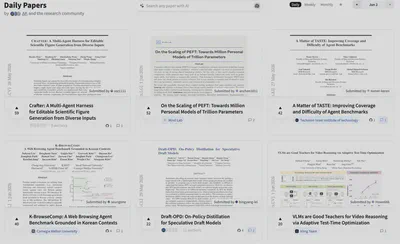
HuggingFace Daily Papers 每日列表
HuggingFace Daily Papers:每天几十篇论文需要我们自己点进去逐个挑选

Tex源码 or PDF

关于论文分析的真实性和技术实现,我有两点考虑:

  1. 真实性:论文发表的单位应当是frontier的高校/机构
  2. 流程:为了便于分析,应该让 Agent 直接读取论文的 tex 源码,而不是PDF。

之所以不建议读 PDF,是因为 PDF 在解析时容易出现各种问题,而且也难以进行字符串匹配(比如要在正文里找 github.com/ 这样的链接)。


实现

先Python初筛,再交给 Agent 自主执行

我希望它每天自动爬取,让我无感地拿到当天的论文。整体分两步:先用 Python 脚本初筛,再交给 Agent 做判断和整理

对于初筛,HuggingFace 有公开接口,按日期就能取到当天列表,所以我写了个零依赖脚本 fetch_hf_papers.py,用关键词规则粗筛一遍:

# scripts/fetch_hf_papers.py —— 直接调用 HF 公开接口,无需 API Key
url = f"https://huggingface.co/api/daily_papers?date={date_str}"

# 标题命中这些关键词 → 排除
TITLE_EXCLUDE_KEYWORDS = [
    "benchmark", "benchmarking", "bench",
    "speech", "audio", "video", "3d",
    "compiler", "cuda", "kernel", "triton", "tpu", "xla",
    "quantization", "quantisation", "distillation",
]

# 摘要必须命中其一 → 确认是 LLM/VLM 领域
ABSTRACT_REQUIRE_ANY = [
    "large language model", "llm", "vision language model", "vlm",
    "multimodal", "reasoning", "reinforcement learning",
    "instruction tuning", "fine-tuning", "alignment", "agent",
    "chain-of-thought", "in-context learning",
]

只需纯标准库(urllib + json)就够,且不需要 API key。这一步可以把把几十篇筛选到十几篇,剩下的论文需要留给 Agent 来盘。

其次是对论文的判断&分析。 考虑到目前的模型已经可以很好的平衡指令遵循能力与成本,因此决定不做过多的harmness,而是全权交给Agent自主判断。 为此,我将需求写为 Skill


SKILL Pipline Design

SKILL将每篇候选论文分为三个步骤:

第一步,提取 GitHub 链接:优先用 HF 接口的 githubRepo 字段,如果此字段为空,就去 arXiv 的 tex 源码里检索 github.com/

第二步,调用 GitHub Contents API 验证仓库里有没有实质代码:

API: https://api.github.com/repos/{owner}/{repo}/contents

保留(满足其一):
  - 根目录有 .py / .sh / .ipynb 文件
  - 有 src / scripts / train / model / code 等目录

丢弃(命中其一):
  - 只有 README.md / LICENSE / assets 这类非代码文件
  - API 返回 404(仓库不存在或为空)
  - 仓库名 / 描述含 "coming-soon"

第三步,写一段一眼就能看懂的中文摘要,再从一套固定标签里打标签以便筛选:

RL · 微调 · 无需训练 · 长文本 · VLM · MeM(Agent记忆) · API · 扩散模型

最后落成一条 JSON:

{
  "date": "2026-03-12",
  "title": "Prism-Δ: Differential Subspace Steering for Prompt Highlighting in Large Language Models",
  "arxiv_id": "2603.10705",
  "github": "https://github.com/YuyaoGe/PRISM-DELTA",
  "abstract": "PRISM-Δ 是一种提示高亮方法,使 LLM 在生成时优先关注用户指定的文本片段。核心思路是分解正负交叉协方差矩阵的差值以最大化判别能量、消除共享方向,每个注意力头获得连续 softplus 重要性权重(弱但有用的头以降低强度贡献),并扩展到 Value 表示以捕获内容通道信号。在 4 个基准、5 个模型上,PRISM-Δ 在 20 个配置中的 19 个匹配或超越最佳现有方法,相对增益最高 +10.6%,流畅度损失减半,长文本检索场景相对增益最高 +4.8%。",
  "tags": ["无需训练"]
}

Harmness Engineering Design

有了SKILL接下来就是设计 Agent (或者是Subagent) 与 SKILL 的调用关系。

这里两个选择:

  • 主从调度:一个主 Agent 去调度多个子 Agent
  • 并行调度:每天各起一个独立 Agent

对于主从调度,我使用OpenClaw实现,最大subagent数设置为5。

然而经常出现超时的问题,具体而言,让claw调研某 10 天的论文,尽管它会起多个 sub-agent,但超时&超出上下文的问题频频出现,极不稳定。

因此,后来选择了后者的方案:每天一个独立 Agent 并行跑,各自写一个 JSON,最后用主程序合并。一天生成一个论文列表,事实证明,越简单越稳定。

并行用 xargs -P 就够:

# backfill_papers.sh —— 批量补录历史日期,默认并发 6
printf '%s\n' "${MISSING[@]}" \
  | xargs -P "$CONCURRENCY" -I{} bash "$SCRIPT_DIR/run_kimi_one_day.sh" {} "$PAPER_READER_DIR"

合并脚本 merge_batches.py 也只做确定的事:扫 paper_batches/*.json,跳过已有日期,按日期把缺的追加进去。

关于Agent框架的选择

选 Agent 有个硬条件:能在命令行非交互式启动,而不是用进入终端手动操作。

比如:

  • Cursor & Claude Code:需要进GUI界面或者终端操作
  • Kimi CLI:可以将 prompt 作为CLI启动命令中的一个形参,可以很方便的调用,而且KIMI价格便宜

所以对于每一天的处理就是一行命令:

# run_kimi_one_day.sh —— 用 Kimi CLI 处理单天,结果写入 batch JSON
kimi --print --quiet \
  --work-dir "$PAPER_READER_DIR" \
  --add-dir /Users/yuyaoge/Project/Paper_Agent_Skill \
  -p "$PROMPT" \
  > "$LOG_FILE" 2>&1

尽管如此,目前还是需要每天手动启动工作流,我们希望可以对于用户无感运行。因此,希望可以设置一个适配于Macos的自动启动脚本。

在Macos上的自动启动脚本

自动脚本用 macOS 的 launchd,配置 com.yuyaoge.paper-daily-fetch.plist

<!-- 登录 / load 时立即跑一次 -->
<key>RunAtLoad</key>
<true/>

<!-- 之后每 2 小时再跑一次 -->
<key>StartInterval</key>
<integer>7200</integer>

daily_fetch.sh 里有两个Feature值得一提:

  • 不处理今日论文:HuggingFace 在当天是会根据用户的上传而实时更新的,当天爬会漏掉当前时间点后面提交的论文。所以默认抓“昨天往前数 7 天”,而不包括当天的论文,顺便也补上关机那几天的论文。

  • 幂等:不应该每日定时启动,因此不确定所定的时间点是否已经开机。因此,设定为自开机后,每 2 小时跑一次,如果已有结果就跳过,但若是空结果先执行一次;如果git没变化就不 push。


Quick Start

环境要求:macOS、Python 3,以及已安装并登录的 Kimi CLI

1. 克隆仓库

git clone https://github.com/YuyaoGe/Paper_Agent_Skill.git   # Skill + 脚本
git clone https://github.com/YuyaoGe/paper_reader.git        # 数据 + 前端

2. 安装 Skill 到 Kimi

cd Paper_Agent_Skill
mkdir -p ~/.kimi/skills
ln -sfn "$PWD" ~/.kimi/skills/hf-paper-filter

3. 手动验证链路

# run_kimi_one_day.sh YYYY-MM-DD [paper_reader 路径]
./scripts/run_kimi_one_day.sh 2026-06-01 /path/to/paper_reader

4.(可选)批量补录历史区间

# backfill_papers.sh 起始日期 结束日期 [并发数] [paper_reader 路径]
./scripts/backfill_papers.sh 2026-04-25 2026-05-26 6 /path/to/paper_reader
python3 ./scripts/merge_batches.py /path/to/paper_reader

5. 安装定时任务,实现无人值守

cp scripts/com.yuyaoge.paper-daily-fetch.plist ~/Library/LaunchAgents/
launchctl load -w ~/Library/LaunchAgents/com.yuyaoge.paper-daily-fetch.plist

前端展示

最终列表汇总到 paper_list.md 中,以便于 Agent 可以很方便的在文件末尾追加,同时易于前端解析。

前端 设计为纯静态页面,运行时把 Markdown 拉下来解析成卡片,支持按标签筛、按日期检索:

// 前端运行时直接拉取 Markdown 数据源并解析
const resp = await fetch('paper_list.md');
// 每条格式:- **Title** `[Tag]` — [id](url) | [GitHub](url)
//           > 中文摘要
currentPapers.push({ title, tags, links, desc });

托管在 GitHub Pages,定时脚本每天把更新后的 paper_list.md push 到云端,页面同步更新。
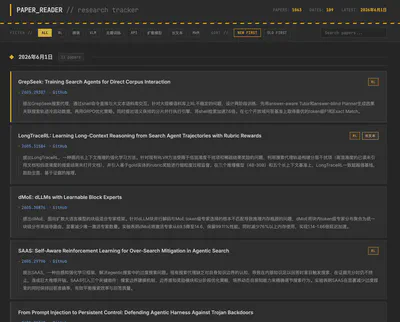
paper_reader 界面
paper_reader:筛选、打标签、生成中文摘要后的样子,可以按标签筛选、按日期排序。

整体流程

综上,整条流程如下:

   macOS launchd ──▶ daily_fetch.sh (每 2h 触发,幂等)
                          │  按天拆分,并行
        run_kimi_one_day.sh × N  (xargs -P 6)
          └─ Kimi CLI 加载 hf-paper-filter Skill
             ├─ fetch_hf_papers.py  Python 初筛
             ├─ GitHub Contents API 验证有无代码
             └─ 写中文摘要 + 打标签
                          │  每天一个 JSON
              paper_batches/YYYY-MM-DD.json
                          │  merge_batches.py 合并
              paper_list.md ──git push──▶ GitHub Pages(前端 fetch 渲染)

用到的东西也都很常规:Python 标准库做初筛、Kimi CLI 做判断、xargs -P 并行、launchd 定时、一个 paper_list.md 当数据源、一个静态页面做展示。

Motivation

As graduate students, we read a lot of papers every day. But beyond reading the papers themselves, deciding which papers to read is just as time- and energy-consuming.

There is no shortage of tools for analyzing papers, for example:

  1. AlphaXiv: reads a single paper very systematically.
  2. papers.cool: built by Su Jianlin; it crawls new arXiv papers daily, uses Kimi to produce Chinese explanations, and lets you keep asking follow-up questions inside Kimi.

These tools go deep on reading a paper, but they share one shortcoming: they do not help with filtering. They can read a given paper in great detail, yet “picking the few worth reading out of the dozens each day” is still on me, and they will not tag papers either. Worse, even when I find a promising paper and want to follow up on its work, I often discover that its GitHub repo is empty, or that there is no link at all — and the effort is wasted.

The sunk cost here is high: when following a paper, I might write code for a long time only to find that some input does not match, or that a reproduction step simply does not work.

So I wanted to build something genuinely useful and actually usable in daily work, so that time goes to work that matters.

Idea

Requirements

Concretely, I want it to filter the papers in HuggingFace Daily Papers every day, and organize them by category.

Papers in HuggingFace Daily Papers are submitted by the authors themselves. That initiative tends to make daily-paper submissions more complete, more credible, and higher in quality than arXiv at large.

The product needs to do three things:

  1. Auto-classification: tag every paper.
  2. Verify a paper’s authenticity and how “easy to follow” it is.
  3. Auto-generate a paper summary (similar to papers.cool).

Here “easy to follow” is defined as:

  • (a) the paper should have a corresponding GitHub repo;
  • (b) the code in that repo must be substantial — a repo with only a README, for instance, is hard to reproduce and should be excluded;
  • (c) datasets and other resources should be open-sourced as well.

HuggingFace Daily Papers list
HuggingFace Daily Papers: dozens of papers a day that you have to click into and sift through one by one.

Tex Source vs. PDF

On authenticity and implementation, I had two considerations:

  1. Authenticity: the publishing institution should be a frontier university / lab.
  2. Pipeline: for ease of analysis, the Agent should read the paper’s tex source directly rather than the PDF.

The reason to avoid PDFs is that PDF parsing breaks in all sorts of ways, and string matching is hard (e.g., searching the body for a github.com/ link).


Implementation

Python Pre-filter First, Then Hand Off to the Agent

I want it to crawl automatically every day, so I get the day’s papers effortlessly. The whole thing is two steps: a Python script does a coarse pre-filter first, then an Agent handles judgment and organizing.

For the pre-filter: HuggingFace has a public API, and you can fetch a given day’s list by date, so I wrote a zero-dependency script fetch_hf_papers.py that filters coarsely by keyword rules:

# scripts/fetch_hf_papers.py — call the public HF API directly, no API key needed
url = f"https://huggingface.co/api/daily_papers?date={date_str}"

# Titles matching these keywords → excluded
TITLE_EXCLUDE_KEYWORDS = [
    "benchmark", "benchmarking", "bench",
    "speech", "audio", "video", "3d",
    "compiler", "cuda", "kernel", "triton", "tpu", "xla",
    "quantization", "quantisation", "distillation",
]

# Abstract must match at least one → confirm it is in the LLM/VLM space
ABSTRACT_REQUIRE_ANY = [
    "large language model", "llm", "vision language model", "vlm",
    "multimodal", "reasoning", "reinforcement learning",
    "instruction tuning", "fine-tuning", "alignment", "agent",
    "chain-of-thought", "in-context learning",
]

The standard library (urllib + json) is enough, and no API key is needed. This step narrows dozens of papers down to a dozen or so; the rest is left for the Agent to weigh.

Next comes judging and analyzing the papers. Since today’s models already balance instruction-following and cost well, I decided not to add much harness and instead hand full judgment to the Agent. To that end, I wrote the requirements as a Skill.


SKILL Pipeline Design

The SKILL splits each candidate paper into three steps:

Step 1, extract the GitHub link: prefer the githubRepo field from the HF API; if it is empty, search the paper’s arXiv tex source for github.com/.

Step 2, call the GitHub Contents API to verify whether the repo has substantial code:

API: https://api.github.com/repos/{owner}/{repo}/contents

Keep (any one of):
  - .py / .sh / .ipynb files in the repo root
  - directories such as src / scripts / train / model / code

Drop (any one of):
  - only non-code files like README.md / LICENSE / assets
  - API returns 404 (repo missing or empty)
  - repo name / description contains "coming-soon"

Step 3, write a concise summary that is understandable at a glance, then assign tags from a fixed set (so the frontend can filter):

RL · Fine-tuning · Training-free · Long-context · VLM · MeM (Agent Memory) · API · Diffusion

Finally it lands as one JSON record:

{
  "date": "2026-03-12",
  "title": "Prism-Δ: Differential Subspace Steering for Prompt Highlighting in Large Language Models",
  "arxiv_id": "2603.10705",
  "github": "https://github.com/YuyaoGe/PRISM-DELTA",
  "abstract": "PRISM-Δ is a prompt-highlighting method that makes an LLM prioritize user-specified text spans during generation. The core idea is to decompose the difference between the positive and negative cross-covariance matrices to maximize discriminative energy and eliminate shared directions; each attention head gets a continuous softplus importance weight (weak-but-useful heads contribute at reduced strength), and the method is extended to the Value representation to capture content-channel signals. Across 4 benchmarks and 5 models, PRISM-Δ matches or surpasses the best existing methods in 19 of 20 configurations, with relative gains up to +10.6%, fluency loss halved, and up to +4.8% relative gain in long-context retrieval.",
  "tags": ["Training-free"]
}

Agent Orchestration Design

With the SKILL in place, the next question is the calling relationship between the Agent (or Subagent) and the SKILL.

There are two choices:

  • Master–worker: one master Agent dispatches multiple sub-Agents.
  • Parallel: spin up an independent Agent for each day.

For master–worker, I implemented it with OpenClaw, capping sub-agents at 5. But timeouts kept happening: asking Claw to survey, say, 10 days of papers, it would launch several sub-agents, yet timeouts and context overruns appeared constantly — very unstable.

So I went with the latter: one independent Agent per day, running in parallel, each writing its own JSON, then a main program merges them. One paper list per day — and as it turns out, the simpler it is, the more stable.

Parallelism is just xargs -P:

# backfill_papers.sh — batch-backfill historical dates, default concurrency 6
printf '%s\n' "${MISSING[@]}" \
  | xargs -P "$CONCURRENCY" -I{} bash "$SCRIPT_DIR/run_kimi_one_day.sh" {} "$PAPER_READER_DIR"

The merge script merge_batches.py also only does deterministic work: scan paper_batches/*.json, skip dates already present, and append the missing ones in date order.

Choosing the Agent Framework

There is one hard requirement for the Agent: it must launch non-interactively from the command line, not require manual operation in a terminal.

For example:

  • Cursor & Claude Code: require a GUI or terminal interaction.
  • Kimi CLI: lets you pass the prompt as an argument to the launch command — easy to invoke, and Kimi is cheap.

So processing a single day is one line:

# run_kimi_one_day.sh — process a single day with Kimi CLI, write the batch JSON
kimi --print --quiet \
  --work-dir "$PAPER_READER_DIR" \
  --add-dir /Users/yuyaoge/Project/Paper_Agent_Skill \
  -p "$PROMPT" \
  > "$LOG_FILE" 2>&1

Even so, the workflow still has to be started manually each day, whereas I want it to run transparently. Hence an auto-start script tailored for macOS.

Auto-start Script on macOS

The auto-start uses macOS launchd, configured via com.yuyaoge.paper-daily-fetch.plist:

<!-- Run once at login / load -->
<key>RunAtLoad</key>
<true/>

<!-- Then run again every 2 hours -->
<key>StartInterval</key>
<integer>7200</integer>

Two features in daily_fetch.sh are worth mentioning:

  • It does not process “today’s” papers: HuggingFace updates the same-day list in real time as authors submit, so crawling today would miss papers submitted later. By default it grabs “the 7 days before yesterday” rather than today, and conveniently backfills the days the machine was off.

  • Idempotency: it should not rely on a fixed daily trigger, since there is no guarantee the machine is on at that moment. So it runs every 2 hours after boot — skip if a day already has results, but run once for empty results; if git has no changes, do not push.


Quick Start

Requirements: macOS, Python 3, and an installed & logged-in Kimi CLI.

1. Clone the repos

git clone https://github.com/YuyaoGe/Paper_Agent_Skill.git   # Skill + scripts
git clone https://github.com/YuyaoGe/paper_reader.git        # data + frontend

2. Install the Skill into Kimi

cd Paper_Agent_Skill
mkdir -p ~/.kimi/skills
ln -sfn "$PWD" ~/.kimi/skills/hf-paper-filter

3. Verify the pipeline manually

# run_kimi_one_day.sh YYYY-MM-DD [paper_reader path]
./scripts/run_kimi_one_day.sh 2026-06-01 /path/to/paper_reader

4. (Optional) Backfill a historical range

# backfill_papers.sh START_DATE END_DATE [CONCURRENCY] [paper_reader path]
./scripts/backfill_papers.sh 2026-04-25 2026-05-26 6 /path/to/paper_reader
python3 ./scripts/merge_batches.py /path/to/paper_reader

5. Install the scheduled job for unattended runs

cp scripts/com.yuyaoge.paper-daily-fetch.plist ~/Library/LaunchAgents/
launchctl load -w ~/Library/LaunchAgents/com.yuyaoge.paper-daily-fetch.plist

Frontend

The final list is aggregated into paper_list.md, so the Agent can easily append to the end of the file and the frontend can easily parse it.

The frontend is a pure static page: at runtime it pulls the Markdown down and parses it into cards, supporting tag filtering and date search:

// The frontend fetches the Markdown data source and parses it at runtime
const resp = await fetch('paper_list.md');
// Each entry: - **Title** `[Tag]` — [id](url) | [GitHub](url)
//             > Chinese summary
currentPapers.push({ title, tags, links, desc });

It is hosted on GitHub Pages; the scheduled script pushes the updated paper_list.md to the cloud every day, and the page updates in sync.

paper_reader UI
paper_reader: what it looks like after filtering, tagging, and Chinese-summary generation — filterable by tag and sortable by date.

Overall Pipeline

Putting it all together, the full pipeline is:

   macOS launchd ──▶ daily_fetch.sh  (every 2h, idempotent)
                          │  split by day, run in parallel
        run_kimi_one_day.sh × N  (xargs -P 6)
          └─ Kimi CLI loads the hf-paper-filter Skill
             ├─ fetch_hf_papers.py   Python pre-filter
             ├─ GitHub Contents API  verify code presence
             └─ write Chinese summary + tags
                          │  one JSON per day
              paper_batches/YYYY-MM-DD.json
                          │  merge_batches.py
              paper_list.md ──git push──▶ GitHub Pages (frontend fetch + render)

The pieces are all pretty ordinary: the Python standard library for pre-filtering, Kimi CLI for judgment, xargs -P for parallelism, launchd for scheduling, a single paper_list.md as the data source, and a static page for display.

Next
Previous

Related